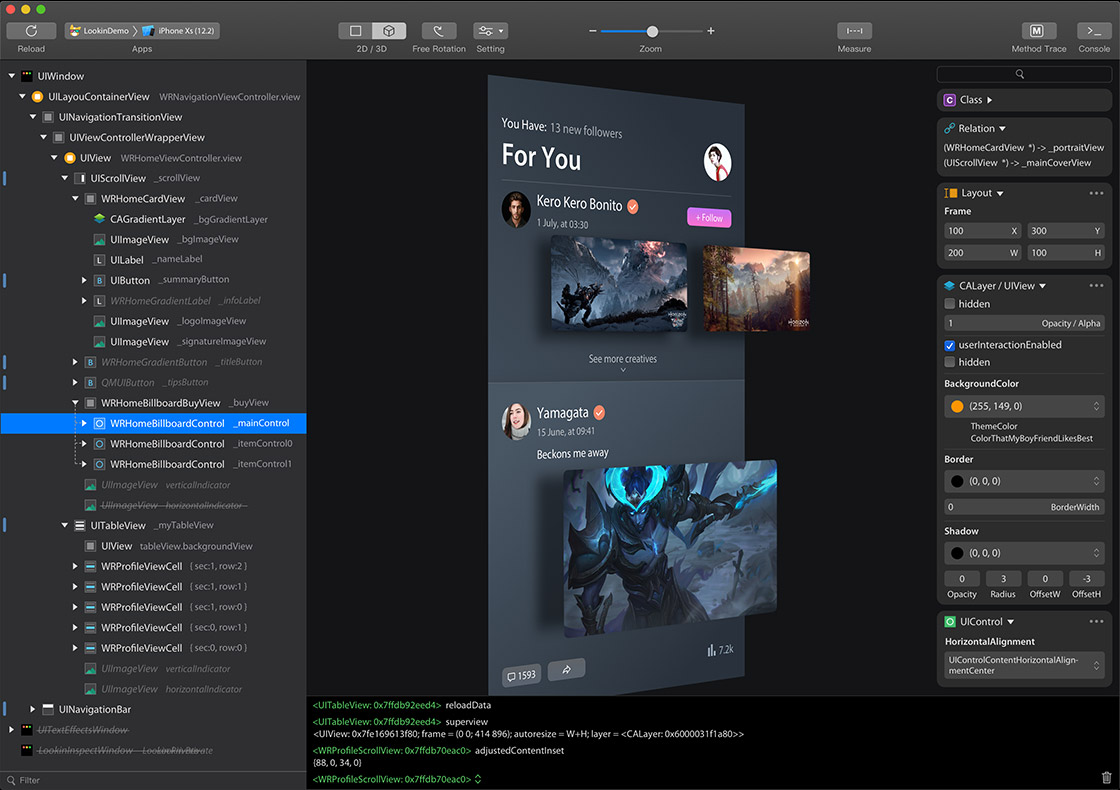
You can inspect and modify views in iOS app via Lookin, just like UI Inspector in Xcode, or another app called Reveal.
Official Website:https://lookin.work/
Fork maintenance notes: Imported Upstream Patches
To use Lookin macOS app, you need to integrate LookinServer (iOS Framework of Lookin) into your iOS project.
Warning
- Never integrate LookinServer in Release building configuration.
- Do not use versions earlier than 1.0.6, as it contains a critical bug that could lead to online incidents in your project: https://qxh1ndiez2w.feishu.cn/wiki/Z9SpwT7zWiqvYvkBe7Lc6Disnab
pod 'LookinServer', :subspecs => ['Swift'], :configurations => ['Debug']
pod 'LookinServer', :configurations => ['Debug']
https://github.com/QMUI/LookinServer/
Wireless inspection is opt-in, CocoaPods-only, and intended for Debug builds on a trusted local network. The transport is not encrypted or cryptographically authenticated. The iOS app asks for confirmation before accepting a new Mac, and remembered device identifiers are checked independently on both sides. One Mac may inspect an app over wireless at a time.
# Swift + wireless inspection
pod 'LookinServer',
    :git => 'https://github.com/nova286/LookinServer.git',
    :subspecs => ['SwiftAndWireless'],
    :configurations => ['Debug']

# Objective-C + wireless inspection
# pod 'LookinServer', :git => 'https://github.com/nova286/LookinServer.git',
#     :subspecs => ['Wireless'], :configurations => ['Debug']
Add the following declarations to the inspected app's Info.plist:
<key>NSLocalNetworkUsageDescription</key>
<string>Connect to Lookin on your Mac for local UI inspection.</string>
<key>NSBonjourServices</key>
<array>
    <string>_Lookin._tcp</string>
</array>
Start discovery explicitly after the app is active. This is intentionally not automatic, so merely linking the subspec does not request local-network permission:
#if DEBUG
NotificationCenter.default.post(
    name: Notification.Name("Lookin_startWirelessConnection"),
    object: nil
)
#endif
Post Lookin_endWirelessConnection to stop discovery, close active wireless transports, and forget the current session. The default Core/Swift subspecs and the default Swift Package Manager product do not compile the wireless transport or CocoaAsyncSocket.
The codex/swiftui-attached-macro branch can expose opt-in SwiftUI semantic nodes through Lookin's existing hierarchy and custom-attribute protocol. The matching macOS client fork adds a dedicated hierarchy mode and automatic refresh after edits.
import SwiftUI
import LookinServerSwift

@LookinInspectable
struct ContentView: View {
    @State private var title = "Hello"
    @State private var enabled = true

    var body: some View {
        VStack {
            TextField("Title", text: $title)
#if DEBUG || STAGING
                .lookinInspectable(
                    id: "content.title",
                    properties: [.string(title: "Text", value: $title)]
                )
#endif

            Toggle("Enabled", isOn: $enabled)
#if DEBUG || STAGING
                .lookinInspectable(
                    id: "content.enabled",
                    properties: [.bool(title: "Enabled", value: $enabled)]
                )
#endif
        }
#if DEBUG || STAGING
        .lookinSwiftUIInspector()
#endif
    }
}
@LookinInspectable automatically wraps the type's body in Debug builds and in Staging builds that define STAGING, gives each rendered instance a unique ID, and inherits its semantic parent from the nearest annotated ancestor. Keep one lookinSwiftUIInspector() modifier near the hierarchy root. Use the explicit lookinInspectable modifier only for custom IDs or editable bindings. The macro remains available to the compiler in other builds, but expands to the original body without a runtime probe call.
The inspector shows only registered semantic nodes by default. Pass includeRuntimeNodes: true to lookinSwiftUIInspector when you temporarily need SwiftUI's lower-level rendered debug nodes.
Every registered node also exposes temporary debug overrides for width, height, offset, scale, visibility, opacity, and background color. Width or height 0 means automatic layout. Values are clamped to safe ranges, live only for the current rendered View instance, and are never written to application data. Current X, Y, width, and height remain read-only.
LookinServer: https://github.com/QMUI/LookinServer
macOS app: https://github.com/hughkli/Lookin/
- How to display custom information in Lookin: https://bytedance.larkoffice.com/docx/TRridRXeUoErMTxs94bcnGchnlb
- How to display more member variables in Lookin: https://bytedance.larkoffice.com/docx/CKRndHqdeoub11xSqUZcMlFhnWe
- How to turn on Swift optimization for Lookin: https://bytedance.larkoffice.com/docx/GFRLdzpeKoakeyxvwgCcZ5XdnTb
- Documentation Collection: https://bytedance.larkoffice.com/docx/Yvv1d57XQoe5l0xZ0ZRc0ILfnWb
https://qxh1ndiez2w.feishu.cn/docx/YIFjdE4gIolp3hxn1tGckiBxnWf
Lookin 可以查看与修改 iOS App 里的 UI 对象,类似于 Xcode 自带的 UI Inspector 工具,或另一款叫做 Reveal 的软件。
如果这是你的 iOS 项目第一次使用 Lookin,则需要先把 LookinServer 这款 iOS Framework 集成到你的 iOS 项目中。
Warning
- 不要在 AppStore 模式下集成 LookinServer。
- 不要使用早于 1.0.6 的版本,因为它包含一个严重 Bug,可能导致线上事故: https://qxh1ndiez2w.feishu.cn/wiki/Z9SpwT7zWiqvYvkBe7Lc6Disnab
pod 'LookinServer', :subspecs => ['Swift'], :configurations => ['Debug']
pod 'LookinServer', :configurations => ['Debug']
https://github.com/QMUI/LookinServer/
无线检查能力是显式可选的,目前仅支持 CocoaPods,且只应在可信局域网的 Debug 构建中启用。传输内容没有加密,设备标识也不是密码学身份证明;首次连接新 Mac 时 iOS App 会要求用户确认,“始终允许”会在两端分别校验已记住的设备标识。同一时刻仅允许一台 Mac 通过无线方式检查当前 App。
Swift 项目使用 SwiftAndWireless subspec,Objective-C 项目使用 Wireless subspec,并继续通过 :configurations => ['Debug'] 限制构建配置。示例见上方英文文档。
被检查 App 的 Info.plist 必须声明 NSLocalNetworkUsageDescription,并在 NSBonjourServices 中加入 _Lookin._tcp。App 启动并进入 active 状态后,发送 Lookin_startWirelessConnection 通知才会开始发现设备;发送 Lookin_endWirelessConnection 会停止发现、关闭当前无线通道并清理本次会话。该能力不会自动启动,默认 Core/Swift subspec 与默认 SPM product 都不会编译无线通道或引入 CocoaAsyncSocket。
codex/swiftui-attached-macro 分支支持把 SwiftUI 语义节点接入 Lookin 现有层级与自定义属性协议;配套的 macOS 客户端 fork 提供独立的 SwiftUI 层级模式,并在修改属性后自动刷新。使用 @LookinInspectable 标记 View 类型后,Debug 构建以及显式定义 STAGING 的 Staging 构建会自动包装 body、为每个渲染实例生成唯一 ID,并从最近的标记父节点继承语义层级。每棵层级只需在根部保留一次 lookinSwiftUIInspector();只有需要自定义 ID 或可编辑 Binding 时才继续使用显式 lookinInspectable modifier。其他构建仍需让编译器解析宏,但展开结果是原始 body,不会调用运行时 Probe。
Inspector 默认只展示已注册的语义节点。如需临时查看 SwiftUI 底层渲染调试节点,可向 lookinSwiftUIInspector 传入 includeRuntimeNodes: true。
每个注册节点还会自动提供临时调试覆盖:宽高、偏移、缩放、隐藏、透明度和背景色。宽或高为 0 时表示继续使用自动布局。输入值会限制在安全范围内,只作用于当前渲染的 View 实例,不会写入业务数据;当前 X、Y、宽、高仍为只读属性。
iOS 端 LookinServer:https://github.com/QMUI/LookinServer
macOS 端软件:https://github.com/hughkli/Lookin/
- 如何在 Lookin 中展示自定义信息: https://bytedance.larkoffice.com/docx/TRridRXeUoErMTxs94bcnGchnlb
- 如何在 Lookin 中展示更多成员变量: https://bytedance.larkoffice.com/docx/CKRndHqdeoub11xSqUZcMlFhnWe
- 如何为 Lookin 开启 Swift 优化: https://bytedance.larkoffice.com/docx/GFRLdzpeKoakeyxvwgCcZ5XdnTb
- 文档汇总:https://bytedance.larkoffice.com/docx/Yvv1d57XQoe5l0xZ0ZRc0ILfnWb
https://qxh1ndiez2w.feishu.cn/docx/YIFjdE4gIolp3hxn1tGckiBxnWf