
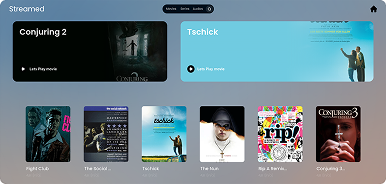
Streamed is a painfully simple media server that lets you stream your local video hoard from a web browser. No subscription, no account, no nonsense, just run it and boom - your questionable anime collection is now wirelessly accessible
- Local Video Streaming: Stream movies and TV shows directly from your own collection to any device with a web browser.
- Dynamic Listing: Automatically generates a list of your available media, with metadata like titles, descriptions, and duration.
- Easy Setup: Just configure your media files, run the server, and the application will do the rest.
- Minimalist Design: Clean and simple interface with minimal configuration required.
- Cross-Platform Support: Can run on any operating system with Python installed.
To get started with Streamed, clone the repository, set up your media files, and run the necessary scripts to populate the server. The main interface is built using basic web technologies like HTML, CSS, and JavaScript.
git clone https://github.com/8nt0n/streamed.git
cd streamedThese two files handle the front-end user interface of your media server.
index.html: This file is responsible for rendering the main webpage, which lists all the available movies and series from your collection. It dynamically loads the media content from data.js, making it easy to update the page when new media is added. style.css: This file defines the look and feel of the page. It applies styling such as colors, fonts, and layout, creating a clean and responsive design for the media list. 2. data.js data.js: This file holds all the metadata for the movies and TV shows in your collection. It's a JavaScript file that is dynamically loaded into index.html to populate the webpage with media content. Each movie or series is represented as an object with several key properties:
{
    title: 'a nightmare on elm street',
    path: 'a-nightmare-on-elm-street',
    length: '1h 31m',
    description: 'the movie is about....',
    type: 'movies',
    id: 'M1',
}
title: The title of the movie or show. path: The URL-friendly version of the title, used for file paths. length: The duration of the movie or episode. description: A brief description of the movie or episode. type: Categorizes the media as either 'movies' or 'series'. id: A unique identifier for each piece of media, used for easy referencing. You can modify this file manually or run scripts (described below) to automate the process of generating the data.js file based on your media folder.
These files are used to automate the process of generating and updating the content in data.js.
update.bat: This batch file serves as a convenient way to run main.py on Windows systems. Instead of manually invoking the Python script, you can simply double-click update.bat to run the update process.
main.py: This Python script scans your media directory, extracts relevant information (like filenames and file paths), and automatically generates or updates the data.js file. It saves you time by automating the process of adding new media to the server.
Place your video files in the designated folder. Run update.bat (or manually execute main.py) to update data.js with the latest metadata.
- thanks.py What’s it do? Nothing. It just says:
No problem!Run it after fixing bugs. It's your emotional support script.
Streamed works by serving a simple webpage that lists your media collection. The backend logic (handled by main.py) scans your local media folder, extracts metadata, and creates a data.js file that contains the necessary details about your media. This data is then injected into index.html dynamically, creating a media catalog on-the-fly.
Python: The backend relies on Python to generate the data.js file. Make sure Python is installed on your system. A Web Browser: Once the server is running, you can access your media library from any device by navigating to the server's URL in a browser. Optional Customizations You can modify the styling in style.css to match your personal preferences or tweak index.html to add additional functionality (like search bars or filters).
If you'd like to contribute to this project, feel free to submit a pull request! Contributions are welcome, whether it's improving the design, adding new features, or fixing bugs. Be sure to follow the project's coding guidelines and maintain clean, readable code.
MIT. Do what you want. Just don’t blame me if it catches fire.